A good performance review looks at the whole of someone’s work. Revenue matters, but so do the customers they serve, the way they get things done, and the skills they build along the way.
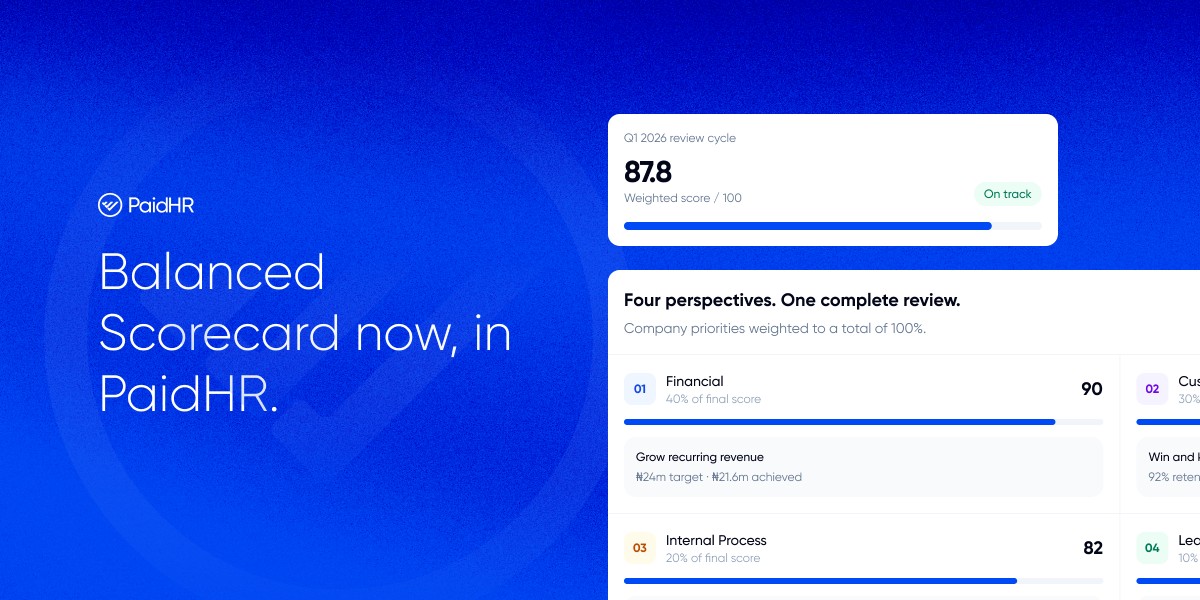
The Balanced Scorecard, now available in PaidHR, gives organisations a way to bring these dimensions into one structured review.
Admins can set up a scorecard for a performance cycle, connect company and department goals, assign measurable KPIs, and run reviews where employees provide results and evidence for managers to confirm.
How the Balanced Scorecard works
The scorecard organises performance goals under four perspectives:
- Financial: revenue, cost and profit.
- Customer: winning and keeping customers.
- Internal Process: how effectively and efficiently work gets done.
- Learning & Growth: skills, people and culture.
Your organisation decides how much each perspective counts. One cycle might weight Financial at 40%, Customer at 30%, Internal Process at 20% and Learning & Growth at 10%. The weights must add up to 100%, and if priorities shift, you can set a different split for a specific review period.
The scorecard then connects those perspectives to company goals, department goals and individual KPIs. A goal gives work its direction; KPIs measure progress. Goals themselves do not carry a score weight. The score is calculated from each person’s KPIs and the perspectives that apply to them.
1. Choose Balanced Scorecard for a performance cycle
When creating a performance cycle, choose Balanced Scorecard as the method. This sets up the cycle to use the scorecard workflow.
2. Name and weight the perspectives
In the cycle’s Perspectives settings, name and order the four perspectives, then set the percentage for each. Check that the weights total exactly 100%.
The perspective split applies across the company for that cycle. You can also set a different split for an individual review period when needed.
3. Set your company’s review rules
Choose the default for who enters KPI figures, whether evidence is required, and which KPI types people can use.
These settings apply across the company, so agree on them before launching reviews. For each KPI, you can still specify who enters its figure and whether evidence is needed.
4. Create company and department goals
Create company goals under the perspective they support. A goal to win and keep more customers, for example, belongs under “Customers”.
You can then cascade that goal into a department. Marketing might have a department goal to grow qualified marketing pipelines. Cascading shows how department work supports a company goal.
Department goals must sit under the same perspective as the company goal they support. Heads of department can create and manage goals and KPIs for their own department; company goals are managed by admins.
5. Add KPIs and assign them to people
Add each KPI to a goal, or leave it without a goal. Set its type, starting figure, target, weight, evidence requirement and who enters the figure. Then assign it to the employees responsible for it.
A KPI should make the expected result clear. For example: Generate 200 qualified leads during the review period.
You can assign a KPI to more than one person. Each person receives an individual copy to complete. Within a perspective, each person’s own KPI weights add up to 100%. You can set a fixed weight, or let PaidHR share the remaining weight across that person’s auto-weighted KPIs.
Example: If an employee has two Customer KPIs, you could give one a fixed weight of 60% and let the other use the remaining 40%.
PaidHR checks the weights for each person and prevents a save that would put their KPI weights over 100%.
6. Create and launch a review period
Create a review period, choose the people included and launch it. PaidHR prepares a self-review and manager-review task for each person.
Employees enter figures for KPIs they are allowed to report, then attach evidence or indicate that they have none when that option is available. Managers review the submissions, enter or adjust figures where the KPI rules allow, and confirm the review.
When a review is confirmed, PaidHR saves a snapshot of its figures, weights and scores. When the review period is locked, participants can no longer submit figures. Once scores are published, they are final.
How scoring works
PaidHR scores each KPI against its target, combines a person’s KPI scores within each perspective using their KPI weights, then combines the perspective scores using the cycle’s perspective weights. Only perspectives where the person has KPIs count toward that person’s score.
Each KPI is capped at 100%, so exceeding one target cannot push that KPI’s score above 100%. PaidHR also shows how a score was calculated, so reviewers can see the figures and weights behind it.
What employees & managers see
- Employees see their own scorecard, the goals and KPIs assigned to them, their weights and their review history. During a review, they enter their figures and provide evidence where required.
- Managers see the scorecards and review submissions for their direct reports. Depending on the KPI’s input rule, they enter the figure themselves, review the employee’s figure, or view an employee-reported figure without changing it.
- Admins can see company-wide scorecard information. Heads of department see the scorecard information for the departments they lead.
A clearer structure for performance
The Balanced Scorecard gives teams a shared structure for setting goals, tracking measurable results and reviewing evidence.
Admins can configure the cycle to fit their organisation, while employees and managers can see how the review connects to the work assigned to them.
Book a walkthrough to set up your organization’s first Balanced Scorecard performance cycle.